Quick Start Guide
Add App Configuration
Industrial Edge supports specific app configuration types. For an in-depth documentation about the different configuration types and their use cases, refer to the Industrial Edge Management documentation.
Following app configuration types are available:
- Unversioned Configuration
- Versioned Configuration
- Template-based Configuration - Text based
- Template-based Configuration - Schema based
Each of these types can be added to your app via the IECTL respectively via the IE App Publisher.
NOTICE
When uploading an app version to the portal, the app configuration is synchronized. Any configurations in the portal that do not match the app configuration uploaded with the new version are deleted.
Unversioned Configuration
Unversioned configurations are user provided inputs of any content type (i.e. text files, binary files, etc.).
You add unversioned configurations with the following command:
iectl publisher standalone-app app-config add \
    --appname "My example application" \
    --configname "UploadConfig"  \
    --configdescription "Upload a configuration file"   \
    --hostpath "volumename"  \     # Or relative host volume path, e.g. "./cfg-data"
    --subpath "subdir/"         # Will be added behind the volume / bind mount point
NOTICE
The hostpath argument can either be the name of a volume specified in the docker compose, or the host path of a bind, so for example "./cfg-data" for the bind "./cfg-data/:/cfg-data/" in the docker compose file.
The subpath is then a directory or chain of subdirectories which will be created in that volume or bind, so for example if host path is set to "./cfg-data" and subpath to "custom/config", the directory "/cfg-data/custom/config" will be available in the container.
The uploaded file will then be placed in the joined host- and subpath with its original filename. In total the final file path for an uploaded file from for example /home/user/Documents/configuration.json would result in the container in /cfg-data/custom/config/configuration.json.
Versioned Configuration
Versioned configurations provide the option of predefined configurations of any content type (i.e. text files, binary files, etc.).
You add versioned configurations with the following command:
iectl publisher standalone-app app-config add \
    --appname "My example application" \
    --configname "VersionedConfiguration" \
    --configdescription "Select one of the available configurations." \
    --hostpath "./cfg-data/" \                                          # volume name or relative host path with bind
    --subpath "" \
    --versioned \
    --versionname "AdvancedConfiguration" \
    --versiondescription "Versioned configuration advanced v1" \
    --filepath /path/to/configuration/file                                  # filepath: File that shall finally be used as input
NOTICE
The behavior of host- and subpath are the same as for Unversioned configuration, but the filename is take from source file specified under filepath. For the example configuration above the resulting file location inside the container would then be /cfg-data/file (assuming the standard bind of "./cfg-data/:/cfg-data/").
Template-based Configuration - Text based
Text based configurations provide the option to adapt text based configurations (from templates) as required during the deployment.
You can add them with the following command:
iectl publisher standalone-app app-config add \
    --appname "My example application" \
    --configname "TextConfig" \
    --configdescription "Configure your example application" \
    --hostpath "./bind/path/on/host" \
    --subpath "config/templated/" \
    --templatename "TextConfigTemplate" \
    --templatedescription "Text Config Template v1" \
    --filepath "/path/to/configuration/sample.json"
NOTICE
Similar to versioned configuration is the filename taken from the template file specified in filepath. For the example above the resulting file path inside the container is /bindmount/config/tamplated/sample.json, asuming the bind "./bind/path/to/host:/bindmount" is specified in the docker compose file.
Template-based Configuration - Schema based
Schema based configurations give the user the option to provide configurations in a wizard, supporting complex types to create JSON based configurations.
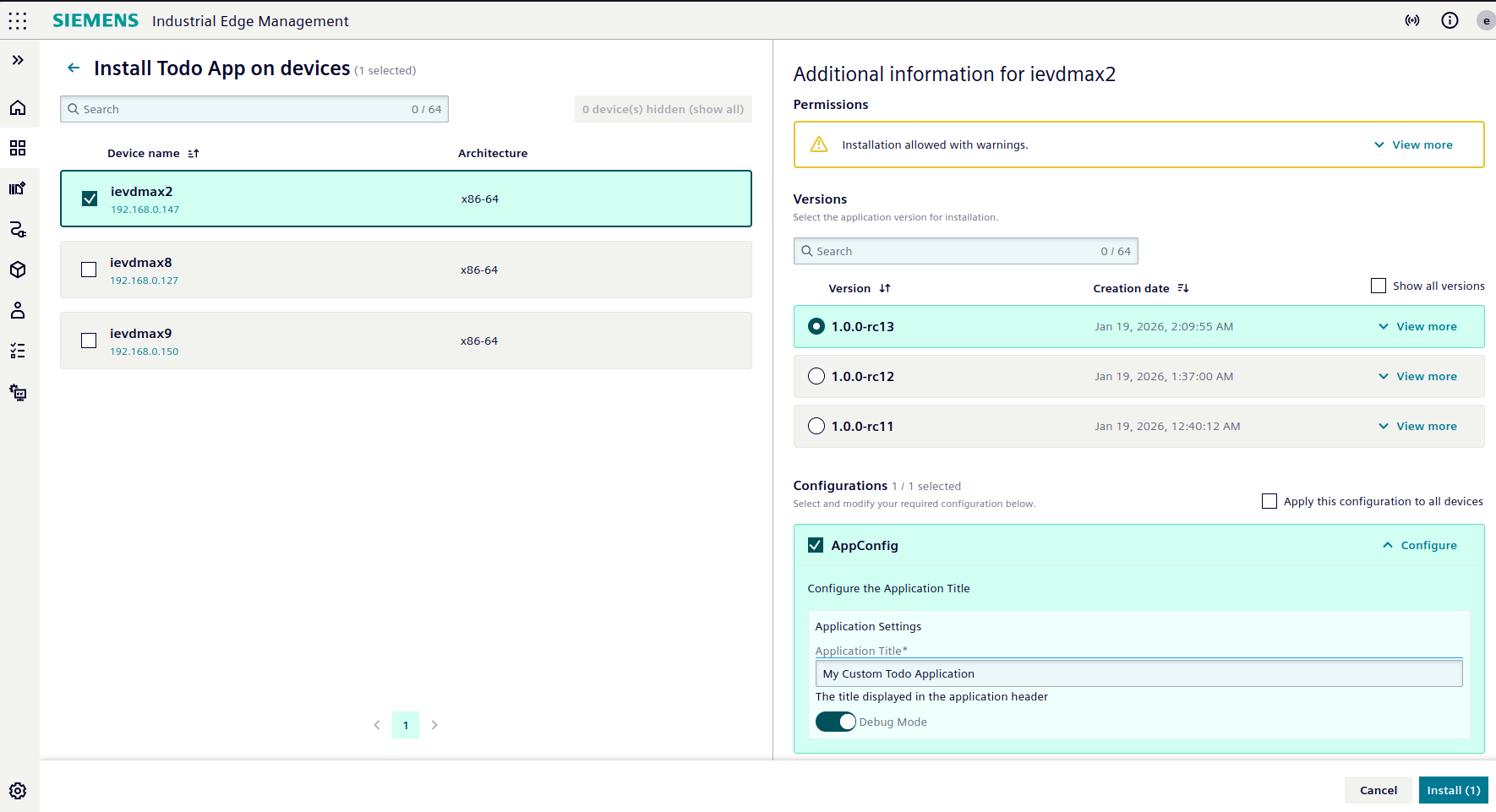
From this schema:
{
  "uischema": {
    "type": "Control",
    "scope": "#/properties/app_title",
    "label": "Application Title",
    "options": {
      "description": "The title displayed in the application header"
    }
  },
  "dataschema": {
    "type": "object",
    "properties": {
      "app_title": {
        "type": "string",
        "default": "Todo Application",
        "description": "The title displayed in the application header",
        "minLength": 1,
        "maxLength": 100
      },
    },
    "required": ["app_title"]
  }
}
the application would then receive this config file:
{
  "app_title": "My Custom Todo App"
}
You can add them with the following command:
iectl publisher sa app-config add \
    --appname "My example application" \
    --configname "SchemaConfig" \
    --configdescription "Configure the Application Title" \
    --hostpath "./cfg-data/" \
    --templatename "SchemaConfigTemplate" \
    --templatedescription "Configuration Template Schema v1" \
    --jsonschema \
    --filepath "/path/to/configuration/schema.json"
NOTICE
The Application Configuration Service creates using the JSON Schema specified in the provided file (and potentially user input) a new JSON file. This file is then stored using the same filename as provided under filepath. For the example above the resulting configuration file path inside the container would be /cfg-data/schema/schema.json (assuming default mount path "./cfg-data/:/cfg-data/").