Create App Version with Reverse Proxy
During the application version creation the reverse proxy configuration can be provided.
When an application gets installed on an Industrial Edge Device the nginxjson configuration is used to generate proper nginx configuration files.
iectl publisher sa version create -a "Todo App" -v "1.0.0" \
    -y todo-app/docker-compose.yml \
    -n "$(jq -c 'map_values(map(.headers |= tojson))' todo-app/nginx.json)" \
    -t "FromBoxReverseProxy" -s "frontend" -u "todo-app/"
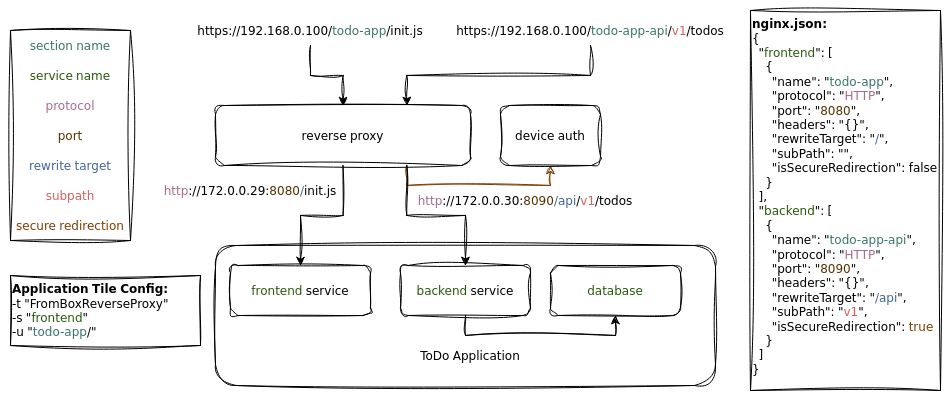
The docker compose file of this application has the following services defined:
version: "2.4"

services:
  frontend:
    ...
    networks:
      - proxy-redirect

  backend:
    ...
    networks:
      - proxy-redirect

  database:
    ...
    networks:
      - proxy-redirect

networks:
  proxy-redirect:
    external: true
The reverse proxy configuration for this application is defined in the nginx.json file as follows:
  "frontend": [
    {
      "name": "todo-app",
      "protocol": "HTTP",
      "port": "8080",
      "headers": {
        "proxy_set_header X-Forwarded-For": "$proxy_add_x_forwarded_for",
        "proxy_set_header X-Forwarded-Proto": "$scheme",
        "proxy_set_header X-Real-IP": "$remote_addr",
        "proxy_set_header X-Forwarded-Host": "$host"
      },
      "rewriteTarget": "/",
      "subPath": "",
      "isSecureRedirection": false
    }
  ],
  "backend": [
    {
      "name": "todo-app-api",
      "protocol": "HTTP",
      "port": "8090",
      "headers": {},
      "rewriteTarget": "/api",
      "subPath": "v1",
      "isSecureRedirection": true
    }
  ]
}
On the device the resulting nginx configuration is:
location = /todo-app {
    rewrite /todo-app/(.*) /$1 break;
    rewrite (^/todo-app)$ $1/ permanent;
}
location ~* ^/todo-app\/ {
    rewrite /todo-app/(.*) /$1 break;
    rewrite /todo-app/ / break;
    rewrite (^/todo-app)$ $1/ permanent;
    proxy_pass http://172.17.1.6:8080;
    proxy_set_header x-forwarded-proto $scheme;
    proxy_set_header x-real-ip $remote_addr;
    proxy_set_header x-forwarded-host $host;
    proxy_set_header x-forwarded-for $proxy_add_x_forwarded_for;
}
location = /todo-app-api/v1\/ {
    rewrite /todo-app-api/(v1.*) /api/$1 break;

    rewrite (^/todo-app-api)$ $1/ permanent;
}
location ~* ^/todo-app-api/v1\/ {
    auth_request /auth;
    auth_request_set $set_cookie_header $sent_http_set_cookie;
    add_header Set-Cookie $set_cookie_header;
    rewrite /todo-app-api/(v1.*) /api/$1 break;
    proxy_pass http://172.17.1.4:8090;
}
Redirect configuration
During application version creation, you can configure the redirection to your application. This configuration is used when a user clicks on the tile of your application in the device UI.
| Flag | Example Value | Description |
|---|---|---|
--redirectsection |
"frontend" |
Name of the service it should be redirected to. |
--redirecttype |
"FromBoxReverseProxy" |
Redirect type used for reverse proxy on the box (device). |
--redirecturl |
"todo-app/" |
URL path of your interface matching pattern: name of location (name + rewriteTarget) with a trailing slash and no leading slash. |
--restredirecturl |
"" |
Subpath to be added to the URL during redirection. |
NGINX configuration
The JSON string passed as the nginxjson argument is a map of all container services that should be exposed through the reverse proxy.
Each service has a list of section names that will be redirected to that service:
-
The name defines the section under which the service will be available. For example, if this is set to dashboard, all requests coming to
https://<device ip>/dashboard/and all subpaths will be reverse proxied to the service. -
If a service should not be available under a direct string, an additional path can be added using the subpath argument. For example, if we set it to foo/bar, the service would be available under
https://<device ip>/dashboard/foo/bar/. -
The protocol field determines if incoming HTTPS requests should be terminated at the reverse proxy ("HTTP") and forwarded unencrypted, or if another secure connection should forward the traffic encrypted to the service.
-
The port defines the port of the service to which the traffic should be passed. The port cannot be exposed to the host at the same time.
-
The rewriteTarget setting determines how incoming requests are rewritten. If set to the default "", requests are passed to the root, and any subdirectories after the name and subpath will be passed along. If the rewriteTarget is set to "/baz", an incoming request to
https://<device ip>/dashboard/foo/bar/file.txtwill be forwarded to the service ashttp://<service ip>/baz/file.txt. -
isSecureRedirection allows only authenticated traffic to be redirected to your service.
-
When bypassUrlDecoding is set, all requests will be forwarded to the service without rewriting the request without the name and subpath.
-
If your application requires special proxy directives to be set, they can be added as an encoded JSON string in the headers field.
NOTICE
To pass informations about the request to the service a number of headers like X-Forwarded-For, X-Forwarded-Proto and X-Forwarded-Host can be used using the proxy_set_header directive.
List of Supported Proxy Directives
- proxy_bind
- proxy_buffer_size
- proxy_buffering
- proxy_buffers
- proxy_busy_buffers_size
- proxy_cache
- proxy_cache_background_update
- proxy_cache_bypass
- proxy_cache_convert_head
- proxy_cache_key
- proxy_cache_lock
- proxy_cache_lock_age
- proxy_cache_lock_timeout
- proxy_cache_max_range_offset
- proxy_cache_methods
- proxy_cache_min_uses
- proxy_cache_purge
- proxy_cache_revalidate
- proxy_cache_use_stale
- proxy_cache_valid
- proxy_connect_timeout
- proxy_cookie_domain
- proxy_cookie_flags
- proxy_cookie_path
- proxy_force_ranges
- proxy_headers_hash_bucket_size
- proxy_headers_hash_max_size
- proxy_hide_header
- proxy_http_version
- proxy_ignore_client_abort
- proxy_ignore_headers
- proxy_intercept_errors
- proxy_limit_rate
- proxy_max_temp_file_size
- proxy_method
- proxy_next_upstream
- proxy_next_upstream_timeout
- proxy_next_upstream_tries
- proxy_no_cache
- proxy_pass_header
- proxy_pass_request_body
- proxy_pass_request_headers
- proxy_read_timeout
- proxy_redirect
- proxy_request_buffering
- proxy_send_lowat
- proxy_send_timeout
- proxy_set_body
- proxy_set_header
- proxy_socket_keepalive
- proxy_ssl_certificate
- proxy_ssl_certificate_key
- proxy_ssl_ciphers
- proxy_ssl_conf_command
- proxy_ssl_crl
- proxy_ssl_name
- proxy_ssl_password_file
- proxy_ssl_protocols
- proxy_ssl_server_name
- proxy_ssl_session_reuse
- proxy_ssl_trusted_certificate
- proxy_ssl_verify
- proxy_ssl_verify_depth
- proxy_store
- proxy_store_access
- proxy_temp_file_write_size
- proxy_temp_path
NOTICE
More explanation about Reverse Proxy options can be found in the Industrial Edge App Publisher Docs under Configuring the Network Page.