Network in Industrial Edge Environment
A proxy (server) is a communication interface in a network, which is handling the communication between two computer systems. The main task of a proxy is the reception of a client request for a server. It will route the request with the proxy's ip address to the server. Therefore, no direct connection between client and server is established.
Proxy server could be realized in two directions, which are also shown in figure Overview about proxy server:
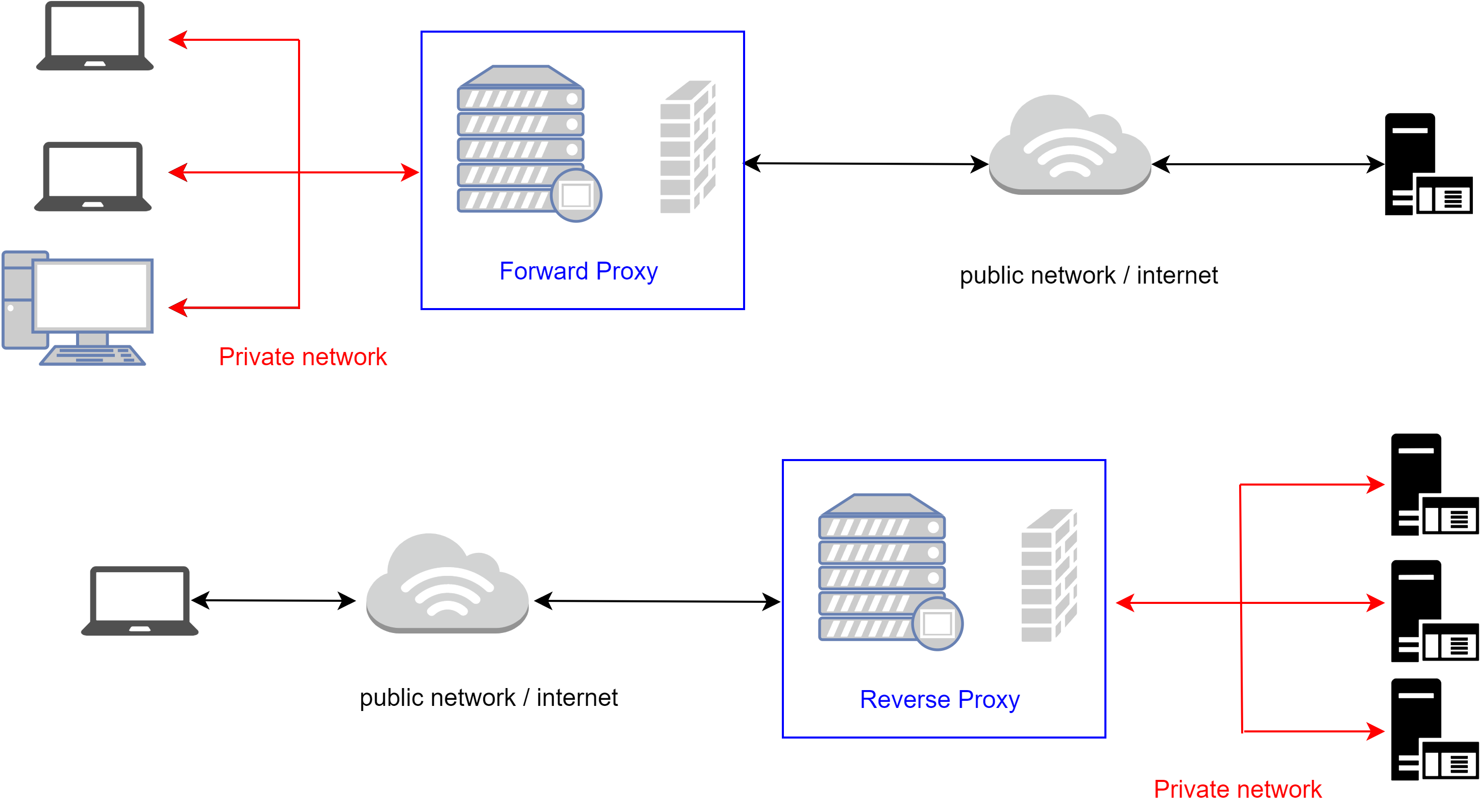
Forward Proxy
A proxy server is installed between a private network and public network/internet. This configuration will help to prevent private clients from influences from public networks. Requests are taken by the proxy and redirected with proxy's IP address to be transferred to the destination. The answer to this request is taken by the proxy and redirected to the private client.
Reverse Proxy
To protect web-server from direct access from the public network/internet, a proxy server can be pre-connected. Public clients will not get direct access to the destination server.Client requests are received, and they can be verified by security rules. After verifications, the request can be sent to a server instance.
Another important network scenario is in a real factory or process plant is that the Industrial Edge components are placed in separate networks. The figure Industrial Edge components in separate networks with Relay-Server configuration shows a typical real-world scenario.
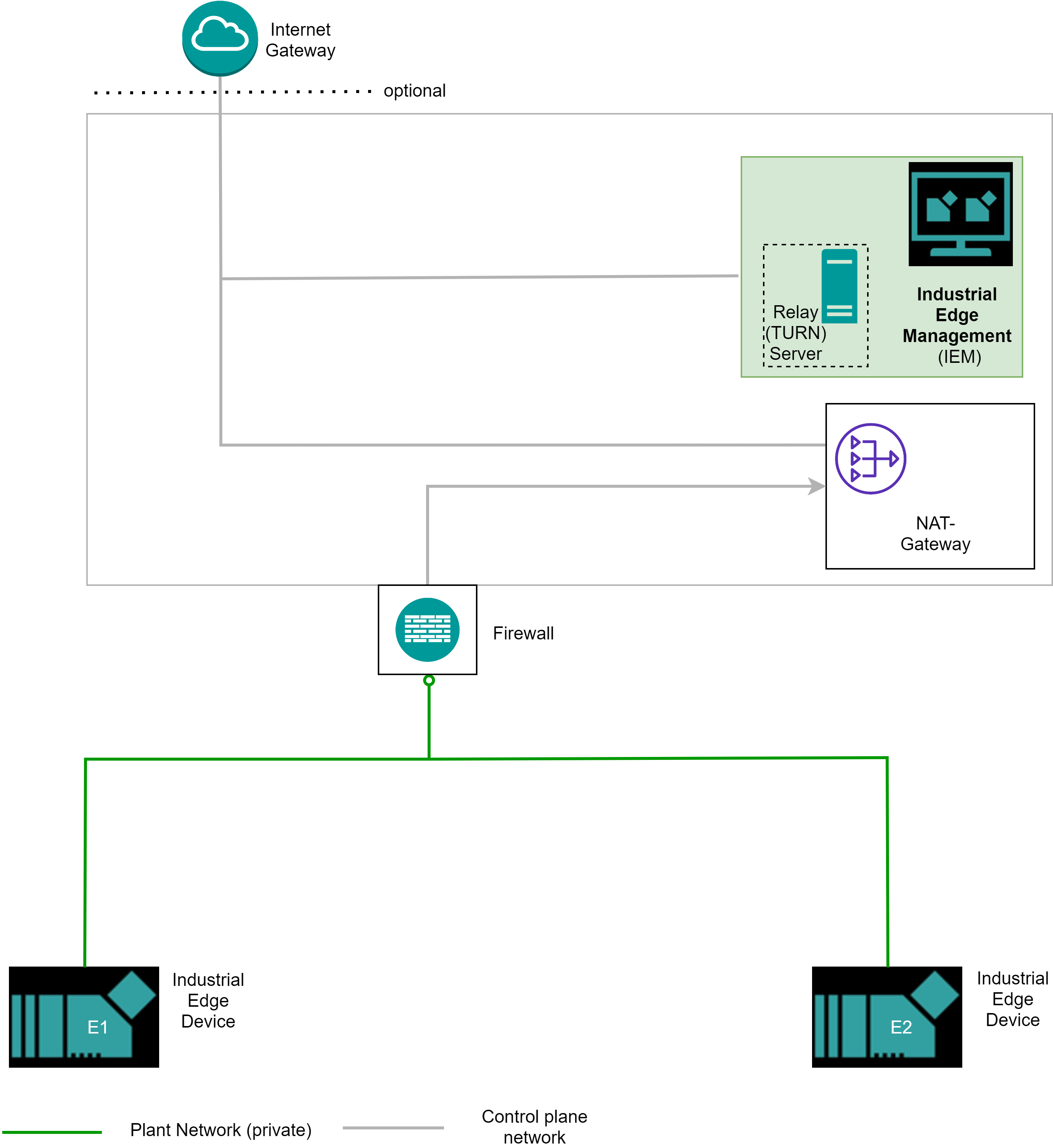
In the plant network the Industrial Edge Devices are configured. The Industrial Edge Management system is placed in the control plane network. A state-of-the-art communication is done via a NAT-Gateway. This means no direct access from the control plane network is possible. Normal operations from the plant network are possible, as the Industrial Edge Device always initiates the communication from its side.
To allow direct access for example “remote access” to debug an Industrial Edge Device a relay server or TURN server is required. With a relay server it is possible to allow initiating the communication from process plane network as well.
In this case the Industrial Edge Devices in the plant network establish the connection to the relay server. The Industrial Edge Management system will act as a relay server for your Industrial Edge Devices. To allow this you must add the IP address of the Industrial Edge Management machine/server. Afterwards you can use the “remote access” through the Industrial Edge Management after activation. It is only a single relay server per Industrial Edge Management instance allowed.
On an Industrial Edge Device are also two noticeable network configurations available. number 1 is the “proxy-redirect” network in the Docker network and number 2 is the Industrial Edge Databus. Both specialties are shown in figure Industrial Edge Device network specialties.
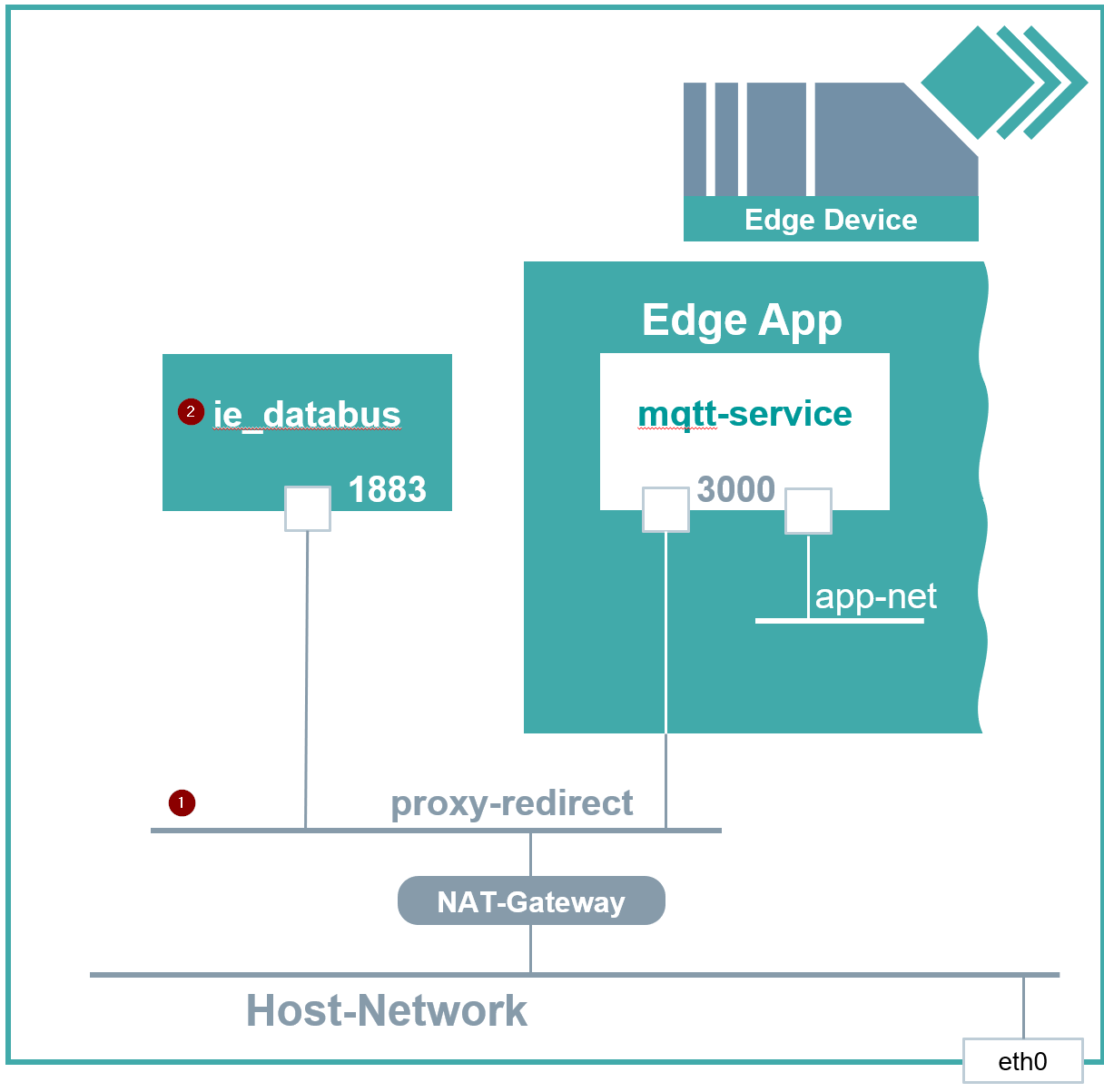
proxy-redirect
The “proxy-redirect” is predefined virtual network in Docker on the IED. With this predefined network it is possible to communicate with system apps by joining this network. Please be aware that this network will not be created by your app as it as a preexisting virtual network on the IED. So, you must mark this network external in your docker-compose file of your app if you need a communication with system apps.
To connect your app to existing proxy-redirect network you must define an external network in your app's docker-compose.yml file. See following example about how to do that.
services:
   pingpong_python:
      # uncomment next two lines for local testing
      #depends_on:
      #  - mosquitto_broker
      build:
         context: ./pingpong_python
      container_name: pingpong_python
      image: pingpong_python:0.0.4
      networks:
         -proxy-redirect
      environment:
         -TOPIC_1=topic1
         -TOPIC_2=topic2
         -MQTT_IP⁼mosquitto_broker
         -MQTT_USER=edge
         -MQTT_PASWWORD=edge
   #uncomment next lines for local testing
   #This spins up a mosquitto mqtt broker in the same network wich acts like the databus
   #mosquitto_broker:
   #  container_name: mosquitto_broker
   #  image: eclipse-mosquitto:latest
   #  networks:
   #     -proxy-redirect
   #  ports:
   #     - "1883: 1883"
networks:
   proxy-redirect:
      external: true
      name: proxy-redirect
Industrial Edge Databus
In combination with the network “proxy-redirect” the Industrial Edge Databus provides the interface between the system apps and your own apps. The Industrial Edge Databus provides a publish-subscribe-pattern based on the MQTT protocol. You can configure channels where you want to publish data to other apps. Other apps subscribe to these defined channels to consume the data.