Restore devices
The backup & restore process for Industrial Edge Devices is managed by a central service called Industrial Edge State Service, which runs within the IEM.
To restore backups of IE Devices, follow the instructions provided on this page.
Requirements
- The IE State Service is available.
- Permission to perform the restore.
NOTICE
Permission
Only the owner and users assigned to the edgedevices.co-admin admin group role of the specific Edge Device have permissions to perform a restore of that device's state.
- The device type and CPU architecture of the source and target device are identical.
NOTICE
The restore of a backup of one device type to a different device type is not officially supported. If it is done nevertheless, it might result in unexpected conditions of the device, for example that not all applications are started during the restore process.
- The runtime of the target device is identical or higher than the runtime of the source device (forward compatibility).
NOTICE
The IEM Admin can see all backups, but cannot restore them without the necessary permissions described above. We are working on improving this in the future.
Restore process
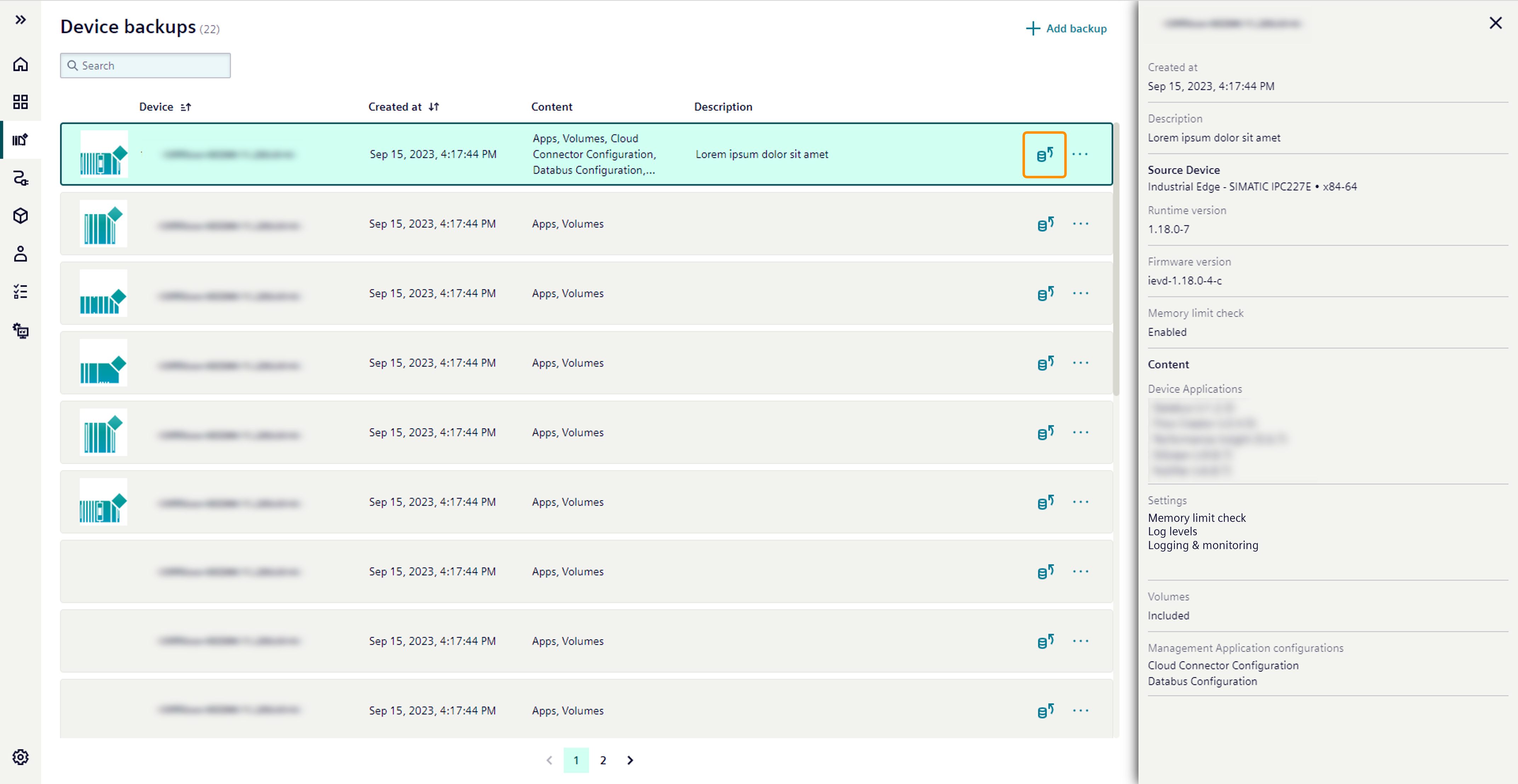
Clicking the Restore button on a backup opens the restore wizard, allowing the user to select the device to restore.
The source device of the backup is displayed at the top and marked with an "origin" tag.
When restoring a backup, all included content resources are automatically selected and cannot be customized.
After selecting a target device, the user can click the Restore button. The restore process begins after another confirmation.
NOTICE
If the memory limit check has been disabled in the backup, an additional warning is displayed in the confirmation dialog. For a specific device version, the restore might fail if the memory limit check is not also disabled on the target device.
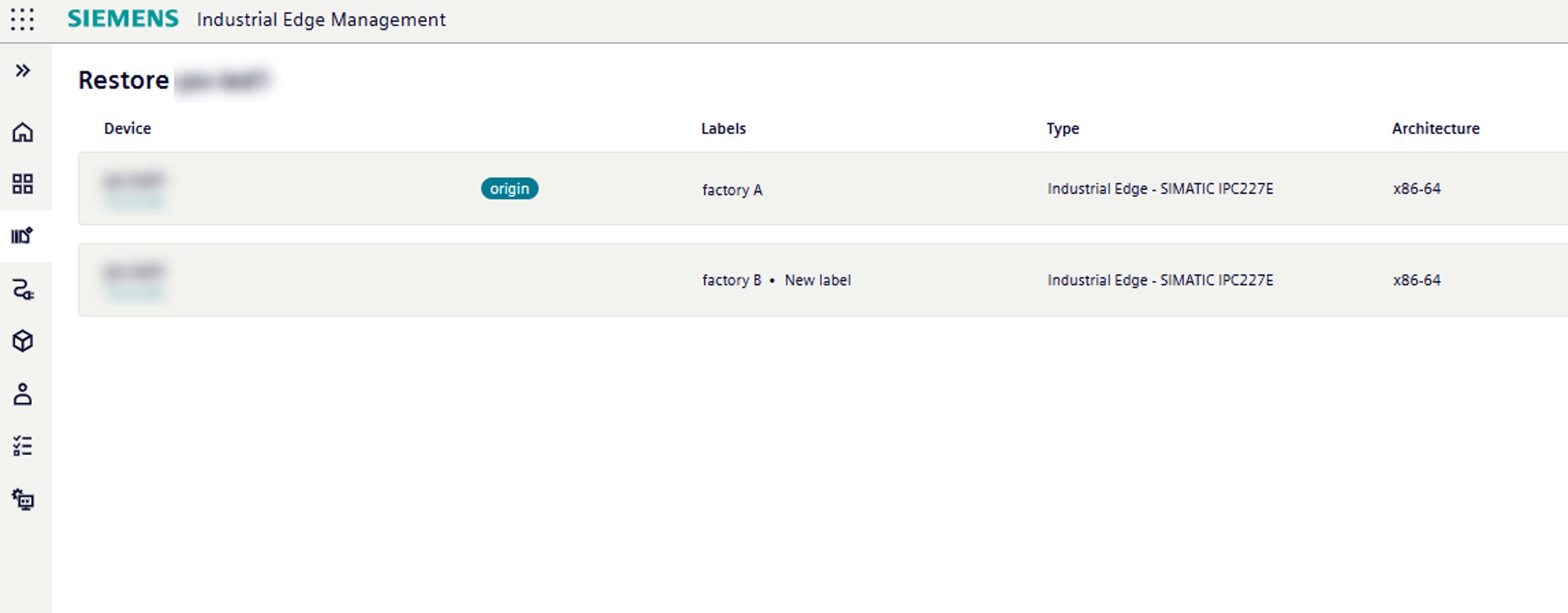
For visibility purposes, the labels that are assigned to the device are displayed in the table. However, the labels are not included in the backup.
Pre-flight check
The restore process starts with a preflight check where the IE State Service checks all content resources for their availability.
If any of the following scenarios are met, the IE State Service does not start the process and returns an error message:
- Device App is not published anymore.
- Device App is deleted.
- Device App version is not available anymore.
- Management App is not available.
- Edge Device does not support backup and restore for app volumes (basic).
- Edge Device does not support backup and restore for app volumes (extended).
The status message indicates the content resource that caused the error.
If any of the content cannot be recovered, the recovery process results in an error. In this case, the device is not reset. If all of the content resources can be recovered, the IE Status Service starts the recovery process.
Device Reset
The IE State Service initiates a device reset to clean up the current state of the target device.
After the device is reset, the restore scenarios are checked again and the restore process continues.
If any of the resources fail during the restore process, the restore process terminates with an error status message.
The Edge Device is reset again.
If all resources succeed, the restore process completes with a success status message.
Restore content
After the device is reset, the restore process follows a specific sequence for restoring content:
- Device settings: Restores the settings of the device.
- Device Apps: Installs applications included in the backup.
- Remaining resources: Restores any other remaining targets.
This sequence ensures that the device settings and applications are restored before any other data, maintaining system integrity and functionality.
NOTICE
Operational impact of "device app data" When device app data is contained in the backup, applications that have been previously installed during the restore process are temporarily stopped to ensure data consistency and integrity. These applications are automatically restarted after the device app data has been successfully restored.
- Device app data included in backup: Previously installed apps are stopped during app data restoration and automatically restarted after completion
- No device app data in backup: Application status remains untouched, ensuring continuous operation
Restore jobs
During the restore process, various jobs may be triggered by the IE State Service on the Edge Device.
| Job on the Edge Device | Trigger time |
|---|---|
| Reset |
|
| App installation | Installing the app versions included in the backup |
| Edge Device Restore | During restore process (for the restore of app volume data) |
When restoring backups, the following job messages can occur in the Job Status page:
| Job Message | Description |
|---|---|
| In progress |
|
| Success |
|
| In cancellation |
|
| Canceled |
|
| Error |
|
Limitations
Following are the limitations of the IE State Service.
-
Catalog Apps - Availability
Apps which are not available respectively which are removed from the Catalog of the IEM cannot be restored, the operation will result in an error.
-
Catalog Apps - Versions
To restore backups containing apps with an older version than the latest available version in the Catalog of the IEM, the initiating user must at least possess the
ie-management.adminrole. -
Project Apps
If the Edge Device contains apps from one or more app projects, the user that initiates a store or restore operation must possess the access right to this resource and therefore either be the
ownerorco-ownerof the respective app project. -
Device App configurations
Instead of restoring configuration file names of the unversioned configuration type / file uploads, configuration IDs are used as file names.
App configurations which are not available respectively which are removed from the app cannot be restored. The operation will result in an error.
-
App state
During the backup and restore process of app volumes, apps running on the Edge Device will be stopped automatically.
If you manually start apps through the Edge Device UI during the restore process, errors might occur resulting in no properly restored app volumes.
To avoid this, do not manually start apps during the restore process.
-
Backups of removed Edge Devices
Backups are related to Edge Devices. If an Edge Device was hard reset or deleted from the IEM, the backup cannot correlate to the Edge Device. Therefore, the backup will only be visible for admin users.
If you want to restore an Edge Device state of a no longer existing Edge Device, the user initiating the restore operation must have the edgedevices.state.store or edgedevices.state.restore permissions and the Admin role in the IEM. This limitation exists because only Admin users have access to all edge device states, even if edge devices are no longer onboarded. As a workaround, the Edge Device can be shared with an Admin user who can restore the selected Edge Device state on that Edge Device.